|
| |
TM 9-2320-360-34-1
(6)
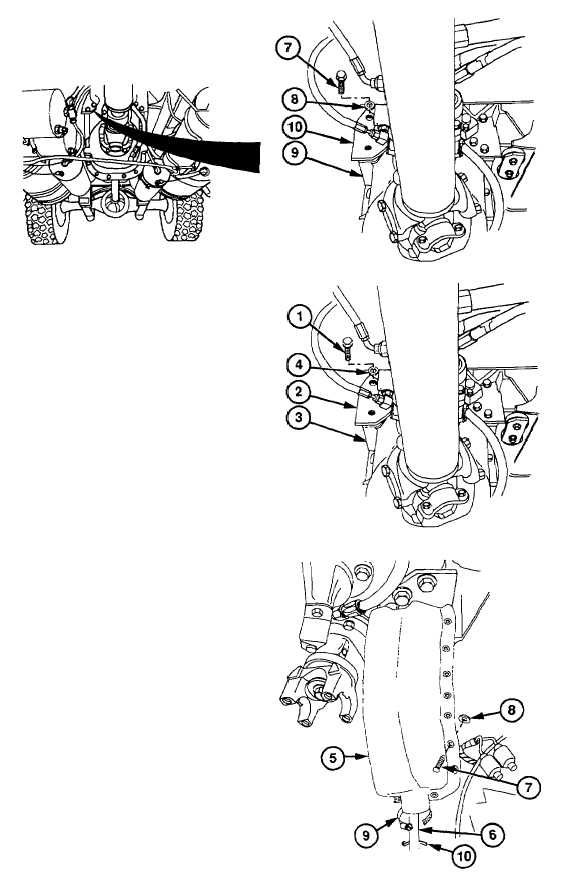
Remove six screws (7) and washers (8)
from transfer case (9).
(7)
Remove bracket (10).
b.
Installation
WARNING
Adhesive-sealant can burn easily,
can give off harmful vapors, and is
harmful to skin and clothing. To
avoid injury or death, keep away from
open fire and use in well-ventilated
area. if adhesive sealant gets on skin
or clothing, wash immediately with
soap and water.
(1)
Coat threads of six screws (1) with
adhesive-sealant.
(2)
Install bracket (2) on transfer case (3) with
six washers (4) and screws (1).
NOTE
Do steps (3) thru (5) for right bracket
only.
(3)
Install boot (5) on cable (6) with seven
new ratchet fasteners (7) and washers (8).
(4)
Install clamp (9) on boot (5).
NOTE
Plastic
cable
ties
should
be
positioned
in
locations
marked
during removal.
(5)
Secure cable (6) with plastic cable ties
(10).
c.
Follow-On Maintenance
Install
transfer
case
mounting
bracket
(para 14-12).
8-15
|