Order this information in Print

Order this information on CD-ROM

Download in PDF Format


Click here to make tpub.com your Home Page

Page Title: Installation
Back | Up | Next

Click here for a printed version

Google


Web
www.tpub.com

Home


Information Categories
.... Administration
Advancement
Aerographer
Automotive
Aviation
Combat
Construction
Diving
Draftsman
Engineering
Electronics
Food and Cooking
Math
Medical
Music
Nuclear Fundamentals
Photography
Religion
USMC
   
Products
  Educational CD-ROM's
Printed Manuals
Downloadable Books


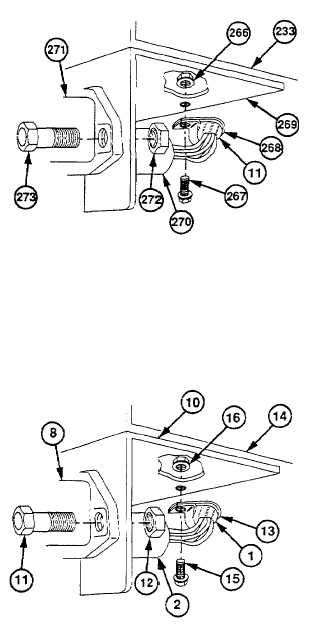
TM 9-2320-360-34-1 (86) Remove  locknut  (266),  screw  (267),  and cushion  clip  (268)  from  rear  crossmember (233) and bracket (269).  Discard locknut. (87) Deleted. (88) Remove two locknuts (272), screws (273), and  7-pin  electrical  connector  (271)  from bracket (269).  Discard locknuts. (89) Deleted. (90) Deleted. (91) Remove   chassis   wire   harness   (11)   from HET Tractor. b. Installation NOTE Evenly distribute any slack in harness. Do not make any connections. (1) Route   chassis   wire   harness   (1)   through HET Tractor. (2) Deleted. (3) Deleted. (4) Install   7-pin   electrical   connector   (8)   on bracket (10) with two screws (11) and new locknuts (12). (5) Deleted. (6) Install cushion clip (13) on harness (1) and rear   crossmember   (14)   with   screw   (15) and new locknut (16). 6-101

Privacy Statement - Press Release - Copyright Information. - Contact Us - Support Integrated Publishing

Integrated Publishing, Inc. - A (SDVOSB) Service Disabled Veteran Owned Small Business